 Back to articles

Best Accounting Integration Platforms in 2026: Deep Sync, Unified APIs, and What Actually Scales
A 2026 guide to accounting integrations that actually scale, from unified APIs to deep, bi-directional sync infrastructure with per-tenant schemas

Chris Lopez
Founding GTM
Best Accounting Integration Platforms in 2026: Deep Sync, Unified APIs, and What Actually Scales
TL;DR
Accounting integration tools differ mainly in how deeply they can connect to a customer’s financial system. Reading standard invoice fields is the minimum requirement, and most tools handle that without difficulty. Writing back to tenant-specific general ledger codes, syncing custom objects in both directions, and adjusting to accounting schemas that vary across customers separates surface-level connectors from production-grade infrastructure.
This guide explains how leading accounting integration platforms in 2026 handle those deeper requirements and where each one fits best.
1. Ampersand: Best for deep, bi-directional, enterprise-level accounting integrations with per-tenant custom object and field support.
2. Apideck: Best for broad accounting platform coverage through a single unified API with real-time passthrough.
3. Unified: Best for teams that a unified API to handle stateless, on-demand accounting data access.
4. Rutter: Best for B2B fintech teams that need low-level accounting and commerce integrations through one API.
5. HotGlue: Best for high-level Python-controlled accounting data ingestion with an embeddable white-label UI.
What Is an Accounting Integration?
An accounting integration is a programmatic connection between your product and accounting platforms like QuickBooks, Xero, NetSuite, etc. that allows financial data to move between systems without manual effort. When an accounting integration is working correctly, invoices created in your billing system are automatically posted to a customer's general ledger, expenses flow to the correct GL codes, and payments are updated on both sides in near real time.
Accounting API vs. Accounting Integration
Accounting API and Accounting Integration are often used interchangeably, but they differ in practical implementation.
An accounting API is the interface a single accounting platform provides for external access. QuickBooks provides one API, Xero provides another, and each platform defines its own authentication model, data structure, and rate limits. When you connect directly to an API, you are working within the constraints of that specific platform.
An accounting integration is the complete system built on top of one or more of those APIs. It manages authentication across customers, maps data fields between systems, schedules sync jobs, handles errors, and provides configuration controls inside your product. While an API gives access to a single platform, an integration keeps data flowing reliably across many customer environments, even when each customer uses a different accounting system with a different schema and field structure.
When Accounting Integrations Become a Category-Level Need
Connecting invoices to a single accounting platform is a feature that one engineer can typically build in a few weeks. The engineering challenge increases significantly when a product needs to support five or more accounting platforms, each with custom objects, bi-directional writes, retries, and per-tenant field mappings. The choice of integration infrastructure determines whether your team ships new accounting connections in days or spends quarters on maintenance.
Why Companies Build Accounting Integrations
SaaS companies invest in accounting integrations because they directly affect whether deals close, whether customers stay, and whether the support team can focus on product issues instead of data reconciliation tickets.
On the revenue side, enterprise buyers expect the products they purchase to connect to their existing general ledger. A procurement team evaluating two competing products will almost always choose the one that offers native NetSuite or Xero integration over the one that requires manual CSV imports, because the integrated product fits into the financial workflows their team already runs. Without accounting integrations, deals stall at the technical evaluation stage.
Once a customer is onboarded, the accounting integration becomes a retention mechanism. When your product writes invoices, expenses, and payments directly into a customer's QuickBooks or NetSuite instance, disconnecting from your product means rebuilding that financial data pipeline from scratch. Customers with deep accounting integrations are significantly harder for competitors to pull away.
Accounting integrations also reduce ongoing operational work. When systems are not aligned, finance teams manually reconcile differences between their general ledger and upstream systems. These mismatches generate recurring support requests and consume internal resources. A stable bi-directional sync keeps financial records consistent and significantly reduces reconciliation-related tickets.
Top Accounting APIs
Before selecting an integration tool, it helps to know which accounting platforms your customers are running. The market is split between SMB accounting software and enterprise ERP systems that include accounting modules.
| Platform | Segment | API Style | Best For |
|---|---|---|---|
| QuickBooks Online | SMB | REST | Small businesses, freelancers |
| Xero | SMB | REST / OAuth 2.0 | SMBs, especially the APAC and UK markets |
| FreshBooks | SMB | REST | Service-based small businesses |
| Zoho Books | SMB | REST | Budget-conscious SMBs |
| Wave | Micro-business | REST | Freelancers, micro-businesses |
| Sage Intacct | Mid-market / Enterprise | REST | Multi-entity mid-market companies |
| Oracle NetSuite | Enterprise ERP | SuiteTalk / REST | Large enterprises, multi-subsidiary orgs |
| Microsoft Dynamics 365 | Enterprise ERP | OData / REST | Enterprise Microsoft ecosystem |
| SAP | Enterprise ERP | Various | Large global enterprises |
Every platform listed above uses a different authentication model, data schema, and write rules. Supporting even three of these platforms from scratch requires your engineering team to learn and maintain three entirely separate sets of API behaviors, which is why the build-vs-buy decision matters so much for accounting integrations.
When to Build vs. Buy Accounting Integrations
Teams typically evaluate three approaches when adding accounting connectivity. They can build integrations in-house, rely on a unified API, or use a deep integration platform.
Building In-House
Building integrations internally gives full control over API calls, field mappings, and sync logic. However, the engineering team must also manage authentication flows, token refresh cycles, rate limits, pagination, and error handling across all supported platforms.
Each additional customer and accounting connector expands the maintenance surface. Supporting multiple platforms requires maintaining separate authentication models and schemas for each one. As coverage grows, engineering time shifts from core product development to ongoing integration and maintenance.
Using a Unified API
Unified APIs reduce the number of connectors by consolidating data from different accounting systems into a single shared data model. This makes the initial setup easier and reduces the amount of platform-specific logic your team has to write.
Limitations appear when accounting platforms include fields or objects that do not fit into that shared model. Platform-specific fields may not be available, and custom objects often require workarounds or higher-tier plans. Products that need to write to tenant-specific fields, such as custom general ledger codes or specialized line item categories, may find that those fields are not accessible through the shared model.
Using a Deep Integration Infrastructure
Deep integration platforms such as Ampersand provide direct API access to each accounting system while managing authentication, rate limits, retries, and infrastructure-level monitoring. Rather than converting every platform into a single shared data structure, Ampersand works with each customer’s actual accounting schema to directly map billing, reporting, and accounting frequency and depth.
Because deep integration platforms work with the real schema, custom objects and tenant-specific fields remain available alongside standard ones. Teams can read from and write to those fields without building separate integrations for each accounting platform. Bi-directional synchronization runs across supported connectors without duplicating platform-specific code.
Why Code-First Accounting Integrations Beat GUI Builders for AI
Initially, integrations were all built by engineers making API calls. iPaaS and particularly embedded iPaaS lowered the barriers for integration creation by adding visual connectors for syncing systems. With iPaaS, it wasn’t just engineers who could build integrations, though let’s be honest it mostly was engineers. In the last two years, the way people build software has changed. Now, AI is creating more and more of the software at the direction of people. Visual workflows for integrations are less compelling because the way we build — AI Assisted — no longer fits with the visual interface. The new interface is code.
Modern AI coding agents are designed to generate, analyze, and modify code directly from natural language prompts. When integrations live in machine-readable configuration files — such as YAML or declarative manifests — AI agents can inspect them programmatically, reason about data structures, and create the integrations within the existing framework. Using Claude Code or Codex on a GUI-only setup experience is impossible. A code-first approach, like Ampersands, means agents can easily generate pull requests, validate schema mappings, or even suggest new sync paths as your product evolves, allowing these agents to own the full integration infra.
By treating integrations as code, you’re not only keeping them in source control with version history and test coverage, you’re also opening the door for AI tools to assist with everything from onboarding new accounting platforms to troubleshooting sync issues — turning integrations into a living system that humans and agents can jointly evolve.
How to Choose Accounting Integration Vendors
If your product supports a single accounting platform and relies solely on standard objects with less than three customers connected, in-house development may be sufficient.
If you need coverage across multiple platforms but only require standardized data models, a unified API can simplify implementation.
If your product depends on custom objects, tenant-specific fields, or bi-directional synchronization across several accounting systems or customers, a deep integration platform like Ampersand is usually the more sustainable option.
The build vs. buy decision should reflect not only current requirements but also the engineering time you are willing to dedicate to ongoing integration and maintenance.
The 5 Best Accounting Integration Tools in 2026
1. Ampersand
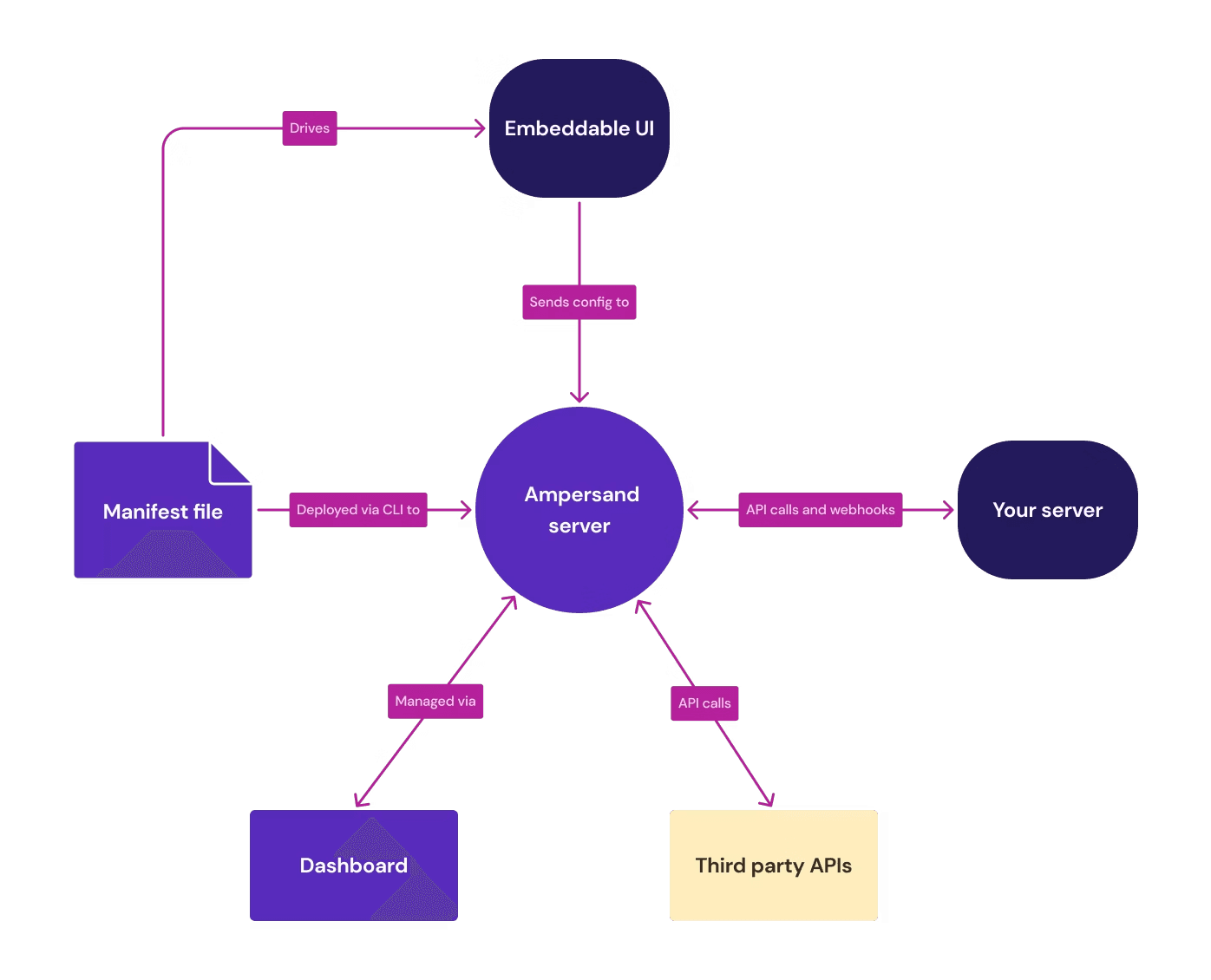
Ampersand supports deep, bi-directional accounting integrations across customized customer environments and works against each customer’s actual accounting schema, which includes custom objects, tenant-specific fields, unique general ledger structures, and vendor-specific configurations. Because Ampersand operates on the real schema, data is not reduced to a shared model, and platform-specific structures remain accessible.
To control how accounting data moves between systems, Ampersand uses declarative YAML configuration files. These files define which accounting objects to read and write, how invoices, expenses, payments, and general ledger fields map between systems, and how data flows in both directions. When a customer requires additional fields or a custom object unique to their accounting instance, Ampersand enables updating the configuration file rather than building a new connector, allowing engineering teams to support many enterprise tenants without duplicating code across environments.
Once sync behavior is defined, Ampersand manages the operational layer of the integration. Authentication flows, token refresh cycles, rate limits, retries, and monitoring run at the platform level for every supported accounting connector. Teams do not implement or maintain these components separately for each system. Pre-built connectors for QuickBooks, Xero, NetSuite, SAP, and Sage Intacct are available through Ampersand’s open source connector library, and teams can review or extend connector behavior when needed.
For customer-facing accounting integrations, Ampersand provides embeddable UI components inside your product. Finance teams can map GL codes, custom fields, and sync preferences directly without filing support tickets. This reduces operational back-and-forth and allows configuration updates without engineering involvement.
As accounting usage expands, pricing remains aligned with data delivery rather than connection counts or API calls. Usage-based pricing keeps accounting integration costs predictable as synced objects and tenant volume grow. Custom objects and fields are priced the same as standard ones, with no tier gating for deep schema access.
Best For: Engineering teams at B2B SaaS companies selling into mid-market and enterprise accounts with complex, customized accounting environments.
Accounting Use Cases: Bi-directional invoice sync, GL code mapping, expense categorization writes, multi-entity consolidation, accounting-to-CRM data flow.
Pros
- Tenant-specific schema adaptation: Reads and adapts to each customer’s accounting schema, including custom objects and tenant-specific fields, without reducing data to a shared model.
- Configuration over code: Accounting sync logic lives in declarative YAML files rather than custom connector code, allowing teams to onboard new customer configurations without rebuilding integrations.
- Multi-tenant scalability from one codebase: Manages different GL mappings, custom objects, and accounting rules across customers without maintaining separate integration branches.
- Version control and CI/CD compatibility: Configuration files live in Git and move through standard review and deployment pipelines, so accounting integrations follow the same release process as core product code.
- Managed connector infrastructure: Authentication, token refresh, rate limiting, retry logic, monitoring, and error handling run at the platform level across all supported accounting systems, removing per-platform maintenance work.
- Standardized read and write operations: Provides consistent methods for syncing invoices, expenses, payments, and GL records across accounting platforms.
- Open-source, extensible connector library: Pre-built connectors for QuickBooks, Xero, NetSuite, Sage Intacct, and other providers are available. Teams can inspect connector behavior, extend functionality, or build additional connectors while maintaining a consistent integration model.
- Full custom object and field support: Supports customer-defined accounting objects and tenant-specific fields alongside standard ones, enabling deep bi-directional synchronization.
- Centralized observability and debugging: Accounting sync runs through a unified platform layer, improving visibility and troubleshooting compared to distributed custom integrations.
- Usage-based pricing aligned to data delivery: Charges based on data delivered rather than connection count or API calls, keeping accounting integration costs predictable as customer volume grows.
Cons
- Requires engineering involvement to configure integrations.
- Designed for deep, bi-directional accounting sync rather than lightweight one-directional data pulls
Pricing: Free to start with 2 GB of data. Paid plans begin at $999/month with usage-based scaling. See pricing details →
2. Apideck
Apideck standardizes data from multiple accounting platforms through a single unified API endpoint, passing requests to the source systems in real time without storing or caching customer financial data. Pricing scales by the number of connected end users rather than API call volume.
Best For: SaaS teams that need to support a wide range of accounting platforms with standard read/write operations and less need for custom object depth.
Accounting Use Cases: Normalized invoice reads, accounts payable sync, and accounting data retrieval for dashboards.
Pros
- 20+ accounting connectors accessible through one API build
- Real-time passthrough with no data storage reduces the compliance burden around financial data
- Consumer-based pricing with unlimited API calls per connected customer
- White-label Vault interface for customer authentication
Cons
- The common schema cannot access vendor-specific custom fields or objects that fall outside the unified data model
- Write-back support varies across connectors, so bi-directional sync is unreliable on certain accounting platforms
- Per-tenant accounting configurations require workarounds that add engineering time
Pricing: Launch at $599/month. Scale at $1299/month. Enterprise plans are custom.
3. Unified
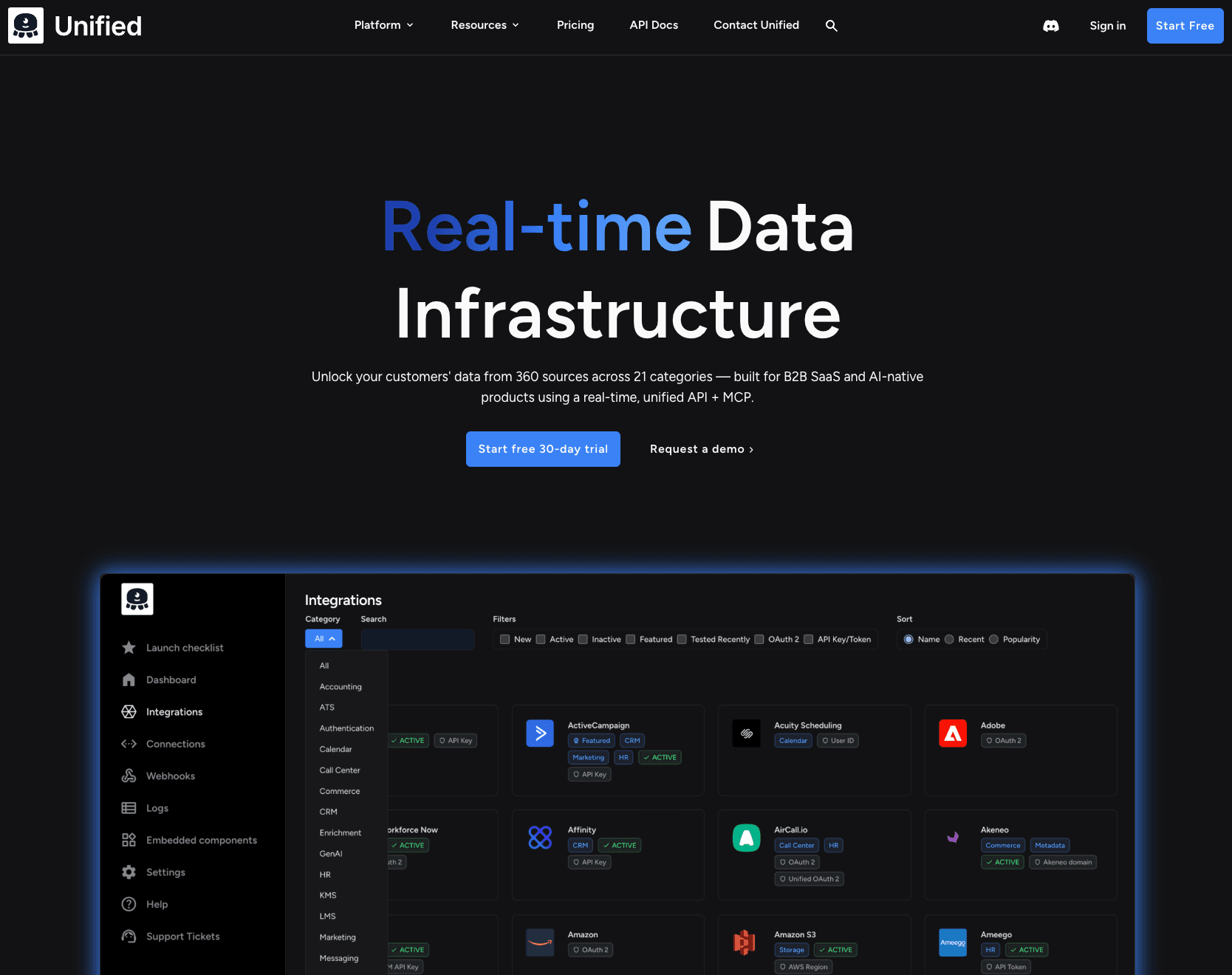
Unified offers a unified API for accounting integrations, with a zero-storage architecture. API requests go directly to the source system, without background synchronization or caching. Unified also provides MCP tools that allow AI agents to perform controlled read and write operations across connected accounting systems.
Best For: AI-powered SaaS products that need real-time, stateless accounting data for embeddings, RAG pipelines, or agent-driven financial workflows.
Accounting Use Cases: On-demand accounting data retrieval, AI-driven financial analysis, and payment gateway sync with accounting platforms.
Pros
- 34+ accounting integrations with stateless, on-demand data access
- Zero data storage with regionalized traffic routing (US/EU/AU) for compliance
- MCP support for AI agents performing accounting read/write operations
- Custom field and custom object support through unified metadata APIs
Cons
- Real-time passthrough adds noticeable latency when syncing complex accounting objects that reference multiple related records, which makes this near-impossible for AI agents relying on sub-second data
- Accounting write operations are less reliable than read operations on several connectors
- API request-based pricing becomes harder to forecast when sync frequency is high
Pricing: Paid plan starts at $750+ per month. Usage-based pricing by API request volume.
4. Rutter
Rutter provides a unified API designed for B2B financial products and supports accounting, commerce, payments, and related financial data workflows. It includes a financial data model designed to support accounting read and write operations across systems.
Best For: B2B fintech companies that need accounting, commerce, and payment integrations through a single vendor.
Accounting Use Cases: Write-back accounting automation, supplier enablement, bank feed integration, and financial statement retrieval for credit underwriting.
Pros
- Financial domain knowledge is reflected in the unified data model and accounting write support
- Covers accounting, commerce, payments, and ads in one API, reducing vendor count for fintech teams
- White-label Rutter Link handles customer authentication across platforms
- API passthrough available for accessing data outside the unified schema
Cons
- Custom pricing requires a sales conversation, which makes early-stage budgeting harder
- Teams that only need accounting integrations end up paying for commerce and payment coverage they will never use
- Write-back depth varies by accounting platform, especially for on-premise systems
- The unified data model sharply decreases the efficacy of the platform when custom objects are introduced
Pricing: Free trial for 30 days with limited features. Full access plan with custom pricing.
5. HotGlue
HotGlue is an embedded ETL platform with a unified accounting API schema and a Python-based transformation layer. HotGlue uses open-source connectors built on the Singer and Airbyte specifications and provides a white-label authentication widget that allows end customers to connect and configure accounting data imports within an application.
Best For: Developer teams that need data import to power accounting data transformation and ingestion workflows.
Accounting Use Cases: Bulk accounting data imports from QuickBooks and NetSuite, accounting data normalization, and customer-facing accounting connection management.
Pros
- 600+ open-source connectors, including QuickBooks, Xero, NetSuite, and Sage Intacct
- Python transformation layer (JupyterLab-powered) for complex accounting data manipulation before delivery
- White-label widget and React library for embedded customer-facing setup
- SOC 2 Type II and GDPR compliant, with no customer data stored
Cons
- Built exclusively for data extraction rather than bi-directional accounting sync
- The embeddable widget does not yet support customer-controlled sync scheduling
- Dashboard and SDK customization are still catching up to more established platforms
Pricing: Custom pricing based on active tenants.
Comparison Table: Best Accounting Integration Tools 2026
| Tool | Category | Starting Price | Best For | Notable Features |
|---|---|---|---|---|
| Ampersand | Deep Integration Infrastructure | Free (2 GB) | Customer-facing bi-directional accounting sync | Declarative YAML, open-source connectors, per-tenant custom fields |
| Apideck | Unified API | Free trial | Broad accounting coverage | 20+ accounting connectors, real-time passthrough, no data storage |
| Unified | Unified API | Free trial | AI products needing accounting data | Zero data storage, MCP support, 34+ accounting integrations |
| Rutter | Unified API | Free trial | B2B fintech accounting + commerce | Financial domain expertise, 60+ platforms, write-back support |
| HotGlue | Embedded ETL | Custom pricing | Python-controlled accounting ingestion | 600+ open-source connectors, Python transforms, white-label widget |
Ready to build deep accounting integrations? Start free with Ampersand today →
Why Ampersand Is the Best Accounting Integration Platform
Unified APIs make it easy to connect to multiple accounting systems, but they restrict access to platform-specific fields and custom structures that enterprise customers rely on. Building integrations in-house provides full control, but every additional connector increases long-term maintenance across authentication, rate limits, schema updates, and error handling.
Ampersand eliminates the need to build and maintain connector-specific integration code while preserving full schema access. Engineering teams define accounting sync behavior in configuration files that are part of standard CI/CD workflows. Ampersand manages schema discovery, synchronization, authentication, rate limits, retries, and monitoring across supported accounting systems.
Custom objects and tenant-specific fields are supported without pricing tiers or upgrade gates. Costs scale with the data delivered rather than the number of maintained connections, keeping accounting integration spend predictable as customer volume grows.
For products selling into mid-market and enterprise accounts, Ampersand provides deep accounting integration without requiring ongoing connector maintenance across platforms.
Start building accounting integrations for free with Ampersand →
How We Evaluated Accounting Integration Platforms
We evaluated accounting integration platforms across six criteria that reflect real production requirements.
Integration depth: Whether the platform supports both read and write operations, custom objects, custom fields, and bi-directional synchronization. Read-only access may be sufficient for reporting use cases, but transactional workflows require the ability to post journal entries, update invoice statuses, and write expense data back into a customer’s general ledger.
Connector coverage: If the platform supports the accounting systems your customers use, and whether it extends to adjacent systems, such as CRMs or ERPs that frequently exchange financial data.
Developer experience: Whether the platform follows a code-first model that integrates with version control and CI CD pipelines, or depends on a visual builder that may limit flexibility when accounting schemas are complex.
Authentication management: How the platform handles OAuth flows, token refresh cycles, and credential storage across customer accounts. Accounting systems enforce strict token policies, and failed refresh events during synchronization can leave financial records inconsistent.
Observability: The quality of logs, dashboards, alerting, and error handling. Accounting workflows require clear visibility into synchronization activity because silent failures directly affect financial reporting.
Pricing predictability: How costs scale as customer volume grows. Per-connection, per-API-call, and usage-based models produce different cost curves, and the pricing structure must align with long-term business economics.
Accounting Integration FAQs
What is an accounting integration?
An accounting integration is a programmatic connection between your application and accounting software such as QuickBooks, Xero, or NetSuite. It moves financial data such as invoices, expenses, payments, and journal entries between systems automatically, without manual data entry.
What is the difference between an accounting API and an accounting integration?
An accounting API is the interface a single accounting platform publishes for external access, with its own authentication model, data schema, and rate limits.
An accounting integration is a fully functional production system built on top of one or more APIs. It includes authentication management, field mapping, synchronization logic, error handling, and customer-level configuration.
How do I choose the right accounting integration tool?
Start by identifying how many accounting platforms your customers use, since each additional connector increases maintenance for in-house builds.
Next, determine whether your product requires bi-directional synchronization with custom objects and tenant-specific fields, or only read access for reporting.
Finally, evaluate how much engineering time can be dedicated to integration maintenance versus core product development.
For teams selling into enterprise environments with customized accounting systems, Ampersand’s code-first platform supports deeper integration requirements than unified API models.
Is Ampersand better than Apideck for accounting integrations?
The difference comes down to the depth of integration. Apideck standardizes accounting data into a shared schema, enabling broad platform coverage of common fields.
Ampersand works with each customer’s actual accounting schema and supports custom objects, tenant-specific fields, and full bi-directional writes. It often takes less than a week for users to have a production-grade accounting integration built and deployed.
For products serving customers with heavily customized accounting environments, Ampersand provides deeper access without requiring separate connector maintenance.
How do I get started with accounting integrations?
Start by defining which accounting objects your product needs to read or write, such as invoices, payments, expenses, or general ledger entries. Clarify whether you require read-only access or full bi-directional synchronization.
With Ampersand, you begin by creating a YAML configuration file that defines object coverage, field mappings, and sync direction. Connect to a sandbox accounting environment, validate the mappings, and test synchronization against real data.
Because authentication, rate limits, retries, and monitoring are handled at the platform level, your team focuses on defining integration behavior rather than building connector infrastructure. You can start with Ampersand’s free tier and expand as accounting usage grows.